![12 best cash forecasting software [2026 review]](https://www.cubesoftware.com/hubfs/Landing%20page%20image%20Workshop%20Planning%20in%20Cube_%20Forecasting.png)
Key takeaways:
- Cash forecasting gives finance leaders forward visibility into liquidity, helping prevent shortfalls before they happen.
- Real-time and automated forecasting improves accuracy by reducing manual data handling and spreadsheet risk.
- Strong cash forecasting supports better decisions around hiring, capital expenditures, financing, and growth initiatives.
- Modern cash forecasting software connects directly to accounting, billing, payroll, and ERP systems to create a single source of truth.
Best cash forecasting software at-a-glance
The best cash forecasting software helps finance teams improve liquidity visibility, reduce manual updates, and model different cash scenarios with confidence. The tools below support a range of use cases, from short-term liquidity tracking to multi-entity, long-range forecasting.
- Cube: AI-powered financial intelligence platform that unifies data across spreadsheets, ERPs, and operational systems for automated forecasting and scenario modeling.
- Abacum: AI-native FP&A platform built for mid-market teams managing budgeting, forecasting, and multi-entity reporting.
- Anaplan: Enterprise connected planning platform supporting large-scale financial and operational scenario modeling.
- Cash Flow Frog: Accounting-integrated cash flow forecasting tool focused on rolling liquidity visibility for SMBs.
- Centage: Driver-based FP&A software for mid-market organizations transitioning from spreadsheets to structured planning.
- Drivetrain: AI-native planning platform designed for growth-stage companies with connected revenue and cash modeling.
- Fathom: Reporting and three-way forecasting software that links P&L, balance sheet, and cash flow projections.
- Float: Short-term cash flow forecasting tool with strong 13-week liquidity planning capabilities.
- HighRadius: Enterprise AI platform for treasury, order-to-cash, and automated cash forecasting.
- Jirav: All-in-one FP&A solution for accounting firms and growing businesses needing budgeting and cash visibility.
- Planful: Financial performance management platform supporting close, consolidation, and rolling forecasts.
- Workday Adaptive Planning: Enterprise EPM system for budgeting, workforce planning, and multi-entity forecasting.
We selected these platforms based on core forecasting capabilities, integration strength with ERP and accounting systems, scenario modeling depth, automation features, reporting clarity, scalability, and overall suitability for finance teams in mid-market and enterprise organizations.
We also considered user feedback, market adoption, and how well each platform balances flexibility with governance.
What is cash forecasting?
Cash forecasting is the process finance teams use to project future cash inflows and outflows, enabling leadership to understand the company’s liquidity position at any given point in time.
A cash forecast models expected customer collections alongside planned disbursements, such as payroll, vendor payments, debt service, and capital expenditures. By aligning timing assumptions with operational drivers, finance teams can see projected cash balances across days, weeks, months, or years.
Cash forecasting supports decisions around hiring, capital allocation, financing, cost containment, and growth strategy. Accurate cash visibility gives leadership the confidence to invest when appropriate and act quickly when liquidity risk emerges.
Types of cash forecasting by time horizon
Cash forecasts are built across different time horizons depending on the level of visibility required:
- Short-term (daily to 90 days): Short-term forecasts focus on immediate liquidity. They track expected customer payments, upcoming vendor bills, payroll, and debt obligations to ensure the business can meet near-term commitments and avoid cash shortfalls.
- Medium-term (3 months to 1 year): Medium-term forecasts align projected collections and expenses with the operating plan. This view helps determine whether planned hiring, capital expenditures, or growth initiatives are financially sustainable over the coming quarters.
- Long-term (1 year+): Long-term forecasts support capital planning and strategic decision-making. They estimate future cash generation and funding needs to evaluate debt capacity, expansion plans, and long-term financial resilience.
Types of cash forecasting by method
- Direct method: The direct method projects cash by listing expected inflows and outflows over a specific period. It uses detailed data such as customer payment schedules, vendor invoices, payroll dates, and tax payments to calculate projected cash balances.
- Indirect method: The indirect method starts with projected net income and adjusts for non-cash items and changes in working capital. It connects cash expectations to broader financial plans, making it useful for aligning liquidity forecasts with financial statements.
- Automated/AI-powered cash forecasting: Automated cash forecasting pulls live data from accounting systems, billing platforms, and operational tools to update projections in real time. AI-powered models can detect patterns, adjust for seasonality, surface anomalies, and generate scenario-based forecasts without manual recalculation.
Why is cash forecasting important?
Cash forecasting strengthens a company’s ability to operate with financial control. By anticipating liquidity gaps and funding needs in advance, finance teams can protect operations, reduce reliance on emergency financing, and maintain stability during periods of uncertainty.
- Prevents cash shortages: Accurate cash forecasts help businesses identify when cash on hand may not be sufficient to meet upcoming obligations, allowing teams to take proactive steps such as adjusting spend or securing financing in advance. The U.S. Chamber of Commerce agrees that the primary reason small businesses fail is cash flow issues. Companies that use predictive cash forecasting can identify potential cash shortages earlier than with traditional methods.
- Improves decision making: Cash forecasts turn liquidity into a decision framework. Instead of asking whether an initiative is profitable, teams can determine whether it is financially feasible at a specific point in time. According to McKinsey, organizations using AI for financial modeling and scenario planning have reduced time spent on data capture by up to 65%, allowing more capacity for forward-looking analysis and strategic decision support.
- Optimizes working capital: Cash forecasting enhances control over receivables, payables, and other working capital components. A more predictable view of incoming and outgoing cash lets companies negotiate better payment terms, time collections more effectively, and reduce idle cash balances that could otherwise sit uninvested. This improved planning supports more efficient use of operating capital.
- Improves creditor/investor confidence: Investors and lenders want evidence that a business manages its liquidity responsibly. Transparent, data-backed cash forecasts demonstrate discipline in financial planning and reduce perceived risk. This can improve borrowing terms, increase investment confidence, and support stronger stakeholder relationships.
- Enables effective debt management: Managing debt obligations depends on knowing when cash will be available to meet scheduled payments and maintain covenant compliance. Cash forecasting helps ensure debt service obligations are met on time, avoiding penalties and preserving access to favorable credit lines.
Spreadsheet vs cash forecasting software: What’s the difference?
Many finance teams start cash forecasting in spreadsheets. And while Excel or Google Sheets are flexible, familiar, and easy to customize, they require constant manual updates, version control management, and formula maintenance to keep forecasts accurate and current.
Many finance teams start cash forecasting in spreadsheets. And while Excel or Google Sheets are flexible, familiar, and easy to customize, they quickly become fragile as complexity increases, data sources multiply, and real-time visibility becomes critical to decision-making.
Spreadsheets rely on manual data updates, version control, and formula accuracy. That dependency introduces risk. According to Gartner, 18% of accountants make financial errors daily, 33% make errors weekly, and 59% make several errors per month. When cash forecasts are built on manual inputs and linked files, even small mistakes can distort liquidity projections.
Cash forecasting software, by contrast, connects directly to source systems such as ERPs, billing platforms, payroll tools, and banking data. Instead of rebuilding models each cycle, projections update automatically as new transactions occur.
Here are the key differences:
- Real-time data: Spreadsheets require manual imports and periodic refreshes. Forecasting software integrates with live systems, so cash projections reflect the latest collections, payables, and balances.
- Cash flow visibility: Spreadsheet models often live in isolated files with limited access controls. Forecasting platforms centralize assumptions and data in one governed environment, improving transparency across teams.
- Proactive risk management: Manual models make it harder to detect emerging liquidity risks until they appear in reports. Automated systems can flag anomalies, highlight variances, and surface potential shortfalls earlier.
- Efficiency and automation: Spreadsheets require ongoing maintenance. Dedicated software reduces repetitive data entry and reconciliation work, allowing more time for analysis and scenario planning.
- Scenario modeling and variance analysis: While spreadsheets can support scenarios, they often require duplicating models or building complex logic. Forecasting software enables structured scenario comparison, version control, and faster reforecasting without rebuilding formulas.
Best cash forecasting software
The cash forecasting software below supports a range of needs, from short-term liquidity tracking to multi-entity, long-range scenario modeling, helping finance teams improve forecast accuracy, reduce reconciliation time, and make better-informed financial decisions.
1. Cube
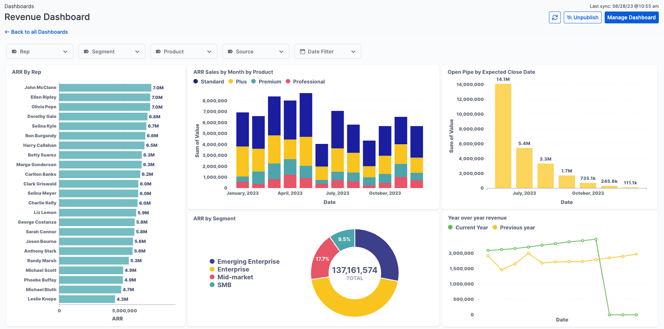
Cube is the financial intelligence platform built for the AI-era. It elevates how FP&A teams plan, analyze, and drive decisions by replacing manual work with automation and intelligence that unify data from every source system into a single, governed, real-time source of truth. Cube’s patented technology lets teams work seamlessly across Excel, Google Sheets, dashboards, and chat with full lineage and auditability.
With AI-driven forecasting, automated variance analysis, and conversational insights, Cube transforms workflows to deliver faster closes, stronger forecasts, and finance teams focused on insight rather than reconciliation. The smartest way to work with the tools you love.
Many companies (like Edge Fitness Clubs and BlueWind Medical) use Cube for nearly all of their financial operations.
Best for: AI-powered financial intelligence, forecasting, and planning
Key features:
- Forecasting powered by AI: Generates forecasts based on past and current financial data to support better decision-making
- Multi-scenario analysis: Model and compare different scenarios based on changes to pricing, demand, or cost assumptions to understand business impact
- Financial Intelligence: Provides finance teams with faster answers, deeper insights, and clearer whys
- Conversational AI in Slack and Teams: Ask Cube questions in plain English and get fast, AI-powered answers without leaving your workflow
Pros:
- Improves version control by allowing department leaders submit forecast and headcount inputs and explore variance drivers in one shared model
- Offers seamless integrations with spreadsheets (Google Sheets and Excel), accounting and finance, HR, ATS, billing and operations, sales and marketing, and business intelligence tools
- Uses AI to give finance teams faster answers, deeper insights, and clearer “whys”
Cons:
- Works best for mid-market businesses—it’s not a personal finances app
- Doesn't provide multilingual support right now
2. Abacum
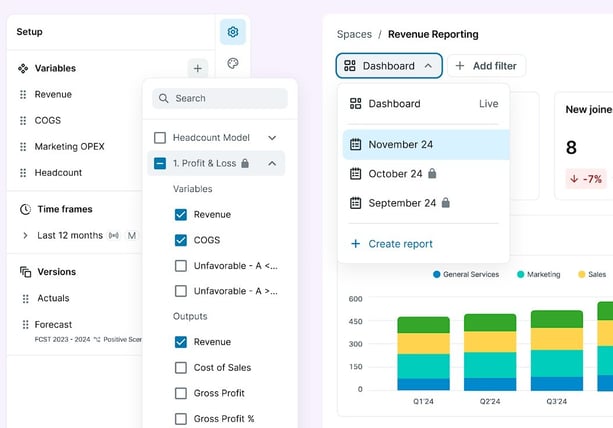
Abacum is an AI-native FP&A platform focused on budgeting, forecasting, and financial reporting. It centralizes financial, operational, and workforce data into structured dashboards that connect to ERP, CRM, billing, and data warehouse systems.
The platform supports multi-entity reporting and consolidation while enabling finance teams to compare plans, forecasts, and actuals within a single environment. Abacum also includes scenario modeling, version control, and KPI-level drilldowns designed for recurring forecasting cycles.
Best for: Mid-market organizations building models
Key features:
- Data integrations: Connects ERP, CRM, billing platforms, and data warehouses to centralize financial and operational data
- Multi-entity consolidation: Supports reporting across multiple subsidiaries or business units within one structured model
- Budget vs. actual reporting: Compares planned financial performance against actual results within the same dashboard environment
- Scenario modeling: Allows teams to build and compare different financial scenarios with saved historical versions
Pros:
- Centralizes financial and operational data into one shared planning environment
- Provides Excel connector support for teams maintaining hybrid spreadsheet workflows
- Allows creation of custom metrics and in-platform data transformations
Cons:
- Some users report occasional bugs in tables and variance calculations
- Chart customization options are more limited than in Excel
- Certain integrations may not pull all required fields without workarounds
3. Anaplan
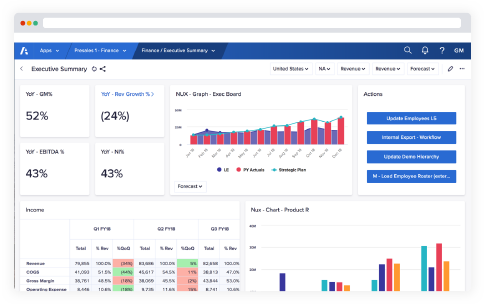
Anaplan is an enterprise scenario planning and analysis platform used for financial planning, forecasting, supply chain planning, workforce planning, and cross-functional modeling. It supports connected planning across finance, sales, operations, and HR within a centralized cloud environment.
It includes multidimensional modeling, workflow management, and enterprise data integration. It is commonly used by large organizations that require structured governance, multi-entity modeling, and cross-department collaboration within a single planning system.
Best for: Finance teams who need reporting and collaborating tools
Key features:
- Scenario planning and modeling: Builds multidimensional financial and operational models that connect assumptions across departments
- Role-based AI agents: Supports predictive, generative, and agent-based planning workflows within defined user roles
- Data management and integrations: Connects to ERP, CRM, supply chain, and other enterprise systems to centralize planning data
- Multi-entity and multi-currency support: Manages planning across subsidiaries, business units, and geographic regions
Pros:
- Provides a comprehensive connected planning ecosystem.
- Allows many users to contribute, review, and perform analysis planning and scenario analysis
- Uses native connectors and Anaplan Connect to integrate with other ERP system
Cons:
- Steep learning curve, particularly for model builders and advanced configurations
- Reporting and dashboard customization can be limited compared to BI tools
- Handling large or sparse datasets can require additional configuration effort
4.Cash Flow Org
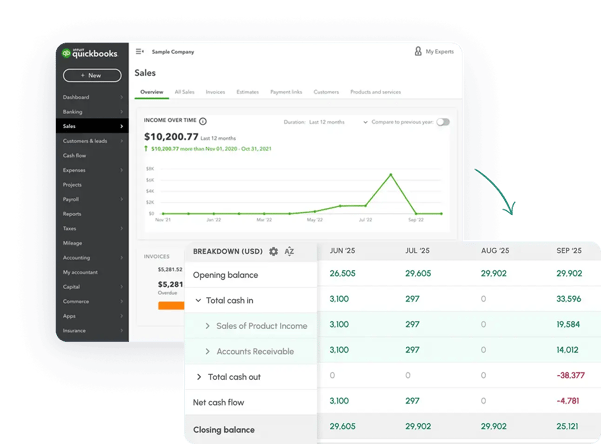
Cash Flow Frog is a dedicated cash flow forecasting platform that integrates directly with accounting systems. It connects with QuickBooks, Xero, Sage Intacct, Zoho Books, and FreshBooks to generate rolling cash flow forecasts based on live accounting data.
Cash Flow Frog focuses specifically on liquidity visibility, short- to mid-term forecasting, scenario analysis, and consolidated cash flow reporting. It is primarily used by small and mid-sized businesses that require direct-method cash forecasting tied closely to their general ledger.
Best for: Businesses that want accounting-integrated rolling cash flow forecasts and scenario-based liquidity planning
Key features:
- Accounting system integration: Syncs with QuickBooks, Xero, Sage Intacct, Zoho Books, and FreshBooks to pull live financial data into forecasts
- Rolling cash flow forecasts: Generates projections up to 36 months based on current and historical accounting data
- What-if scenario modeling: Tests the cash impact of hiring decisions, expense timing, invoice collection, or payment delays
- Cash flow projections: Allows manual or automated projected transactions to be added and adjusted within the forecast
Pros:
- Reduces manual data entry by syncing accounting data automatically
- Provides forward-looking cash flow visibility based on integrated payables, receivables, credit cards, and purchase orders
- Allows manual adjustment of projections when forecast assumptions need correction
Cons:
- Occasional glitches reported by users
- Reporting customization options are limited
- Lack of additional documentation and implementation use cases
5. Centage
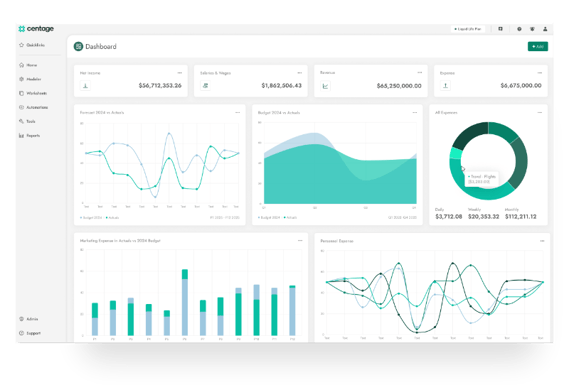
Centage is an FP&A platform designed for budgeting, forecasting, reporting, and multi-entity financial planning. It is commonly used by mid-market finance teams that are transitioning from spreadsheet-based planning to a centralized system.
Actuals can be integrated from accounting and HR systems, allowing finance teams to update projections as new data becomes available.
Best for: Mid-market organizations managing multi-department or multi-entity budgeting and rolling forecasts
Key features:
- Rolling forecasts: Supports 13-month, 18-month, or custom rolling forecast periods that update as actuals are integrated
- Actuals integration: Connects to accounting, ERP, and HR systems to incorporate current financial data into forecast models
- Driver-based forecasting: Builds projections using operational drivers such as revenue inputs, headcount, or departmental expense assumptions
- Scenario modeling: Allows multiple forecast versions to be created and compared within the platform
Pros:
- Generates reports across multiple dimensional levels
- Supports custom calculations across different revenue streams
- Provides expanded reporting capabilities through the Analytics Maestro add-on
Cons:
- Posted entries can take time to reflect in financials
- Unable to delete multiple budget lines, drivers/datalinks
- Copy-and-paste functionality is not available in the current version
6. Drivetrain
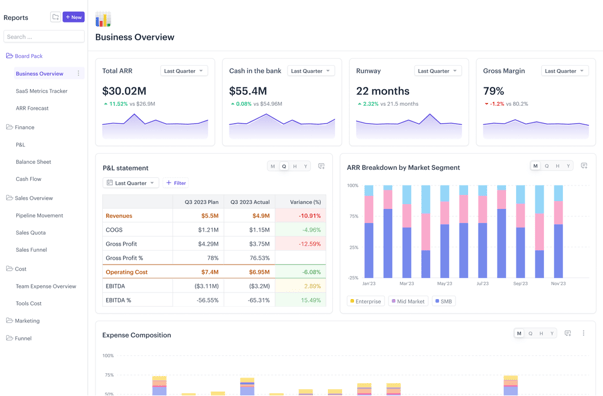
Drivetrain is an AI-native FP&A platform designed for budgeting, forecasting, revenue planning, and financial consolidation. It centralizes accounting and operational data into a connected planning environment used by finance teams managing multi-entity and SaaS-based models.
Drivetrain supports 3-statement modeling and scenario analysis tied to revenue, headcount, and expense drivers. Cash flow projections are integrated within broader financial models, enabling teams to evaluate liquidity, runway, and the downstream impact of operational changes.
Best for: Growth-stage and mid-market companies that require connected revenue, expense, and cash flow forecasting
Key features:
- Scenario modeling: Builds and compares what-if scenarios to assess the financial and cash impact of business changes
- Multi-entity consolidation: Supports consolidation across multiple entities and ERP systems, including intercompany eliminations
- Driver-based planning: Links operational drivers such as sales pipeline, hiring plans, and cost structures directly to financial projections
- Real-time tracking and variance analysis: Monitors plan-versus-actual performance with drilldowns into transaction-level data
Pros:
- Unifies data from multiple systems into a single source of truth, reducing manual data prep and reconciliation
- Enables finance teams to build custom forecasting metrics and reports with multi-dimensional modeling and plain-English formulas
- Provides real-time dashboards and reporting for plan vs. actual monitoring and drilldowns
Cons:
- Has a learning curve, especially for advanced modeling and complex use cases, and users cite documentation gaps
- Users report occasional platform bugs and intermittent connector issues
- Mobile experience is limited for teams that want access on phones or tablets
7. Fathom
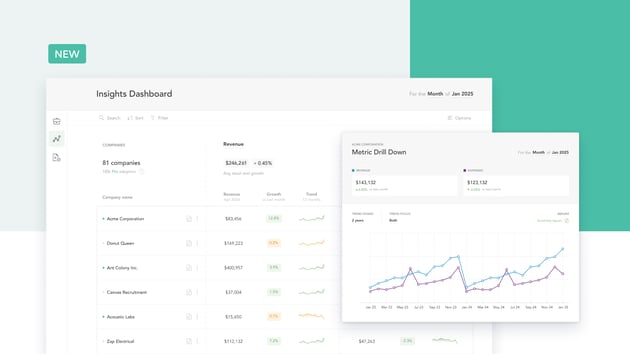
Fathom is a reporting, analysis, and forecasting platform that includes three-way cash flow forecasting, management reporting, and KPI-based performance analysis. It also gives teams a forward-looking view of liquidity by linking operational plans to projected bank balances, so they can see funding gaps early, test timing decisions, and understand how changes in revenue, costs, or investments affect cash over time.
Best for: Three-way cash flow forecasts (P&L, balance sheet, and cash flow)
Key features:
- Three-way cash flow forecasting: Builds integrated P&L, balance sheet, and cash flow forecasts to show projected liquidity as assumptions change
- Driver-based planning: Links forecasts to operational drivers to model cash impact from changes like headcount, pricing, or cost structures
- Planned vs actual reporting: Tracks performance against forecast within management reporting workflows
- Auditability and drill-down: Supports tracing forecast figures back to underlying inputs for review and validation
Pros:
- Saves time by reducing manual spreadsheet work and repetitive reporting tasks
- Allows report templates and recurring financial packs to be reused monthly
- Enables drill-down into metrics and linked data for deeper analysis
Cons:
- Limited language support in documentation
- Forecasting has limitations around accruals, revenue recognition, and prepaid expense handling
8. Float
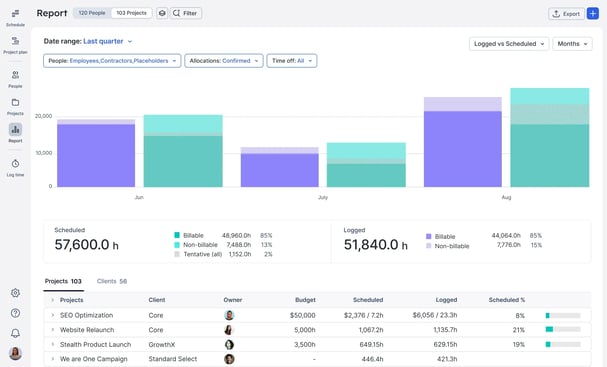
Float is cash flow forecasting software that connects directly to accounting systems like Xero and QuickBooks to create short-term, transaction-level forecasts. It focuses on 13-week cash planning, scenario modeling, and visual cash reporting so finance teams and fractional CFOs can monitor runway, test decisions, and manage liquidity without relying on spreadsheets.
Best for: Businesses, agencies, and fractional CFOs that need short-term cash visibility
Key features:
- Real-time accounting sync: Automatically pulls transactional data from supported accounting platforms to keep forecasts current
- 13-week rolling forecasts: Supports short-term liquidity planning with daily, weekly, and monthly views
- Multi-entity forecasting: Consolidate cash positions across multiple entities or clients
- Budget overlays: Compare forecasted cash against budgets to monitor deviations
Pros:
- Provides a clear visual overview of team availability and project timelines
- Supports capacity planning to prevent over-allocation and burnout
- Offers built-in time tracking with straightforward timesheet management
Cons:
- General lack of automation in regards to float schedule
- Setting up can be time-consuming
- Search functionality on the app can be quite frustrating
9. HighRadius
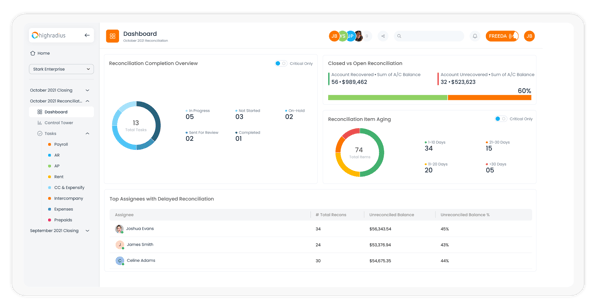
HighRadius provides an AI-driven platform designed for the Office of the CFO, covering Order-to-Cash, Accounts Payable, Close and Consolidation, and Treasury. Its cash forecasting capabilities sit within a broader treasury and liquidity management suite, leveraging AI agents and ERP integrations to automate cash positioning, improve forecasting accuracy, and optimize working capital across large enterprises.
Best for: Agentic AI for finance
Key features:
- AI-driven cash forecasting: Uses machine learning and transaction-level data to improve forecast accuracy and liquidity visibility
- Enterprise treasury management: Supports cash positioning, liquidity tracking, and treasury payments within a unified environment
- ERP and bank integrations: Connects with 50+ ERPs and financial systems to centralize data for forecasting and reconciliation
- Automated cash application: Matches incoming payments with open receivables to improve forecast reliability
Pros:
- Provides intuitive dashboards and KPI tracking for collections performance
- Integrates well with major ERPs like SAP and NetSuite
- Supports multiple company codes and large transaction volumes
Cons:
- Integrations rely on batch processing instead of real-time synchronization
- Email inbox management requires manual monitoring and contact mapping
- Struggles with non-standard remittance formats, reducing match rates
- System performance can slow down with high transaction volumes
10. Jirav
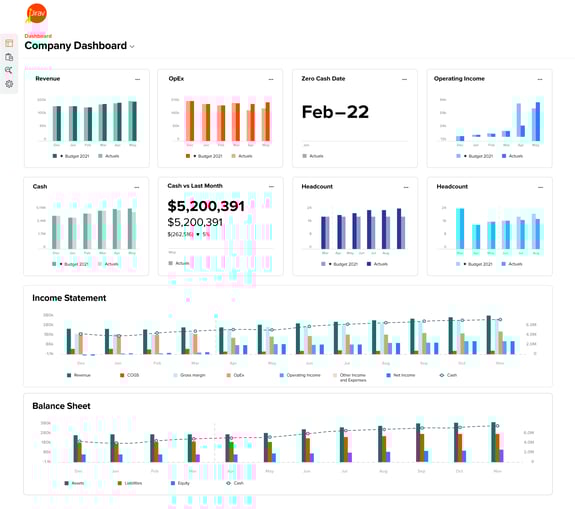
Jirav is an all-in-one FP&A platform built for accounting firms, CFO advisory practices, and growing businesses. It combines budgeting, cash forecasting, reporting, and dashboarding into a single environment, helping finance teams automate plan vs actual reporting, build driver-based models, and collaborate across departments with a shared source of truth.
Best for: Accounting and CFO advisory firms, as well as small to mid-sized growth companies
Key features:
- Custom reporting and dashboards: Automates financial reporting and analytics, with plan vs actual comparisons and multi-scenario visibility
- Driver-based budgeting: Build dynamic budgets tied to operational drivers to model revenue, expenses, and cash flow
- Rolling forecasts: Update mid- and long-range forecasts and adjust assumptions as business conditions change
Pros:
- Saves time by replacing manual spreadsheet-based budgeting and forecasting
- Offers intuitive, driver-based modeling
- Provides robust visual dashboards and executive-ready reports
Cons:
- Steep learning curve for users transitioning from Excel-only workflows
- Lacks structured, guided training programs compared to some other SaaS platforms
- Some visuals may feel overwhelming for clients unfamiliar with detailed FP&A reporting
11. Planful
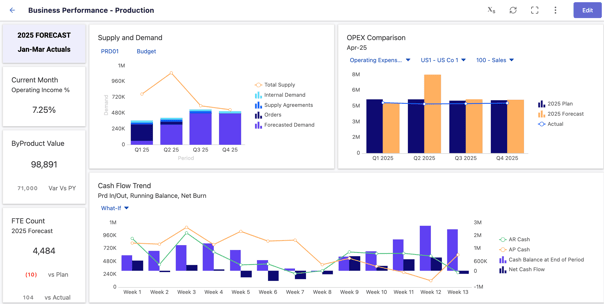
Planful is a financial performance management platform that supports close, consolidation, planning, cash forecasting, and reporting. It is used by mid-market and enterprise organizations to manage financial cycles across departments and entities within a centralized environment.
Planful supports rolling forecasts, scenario modeling, and machine learning-based projections. The platform integrates financial and operational data to align cash flow assumptions with revenue, expense, and workforce planning models.
Best for: Financial close, consolidation, and rolling forecasts across multiple entities
Key features:
- Rolling and continuous forecasting: Maintains forward-looking forecasts that update as new financial data is incorporated
- Scenario modeling: Builds and compares forecast versions based on changes in revenue, expense, headcount, or macro assumptions
- Financial consolidation: Automates eliminations, foreign exchange adjustments, and multi-entity reporting processes
- AI Analyst Assistant: Enables natural-language queries within the platform to explain variances and surface drivers behind forecast changes
Pros:
- Centralized data storage that consolidates inputs from multiple systems into a single platform
- Configurable settings that allow models, reports, and workflows to align with business requirements
- Structured interface with built-in reporting capabilities
Cons:
- Report formatting can be confusing and frustrating
- Data flow between features can be unreliable, which can reduce confidence in figures
- Support has been inconsistent, though it has shown signs of improvement
12. Workday
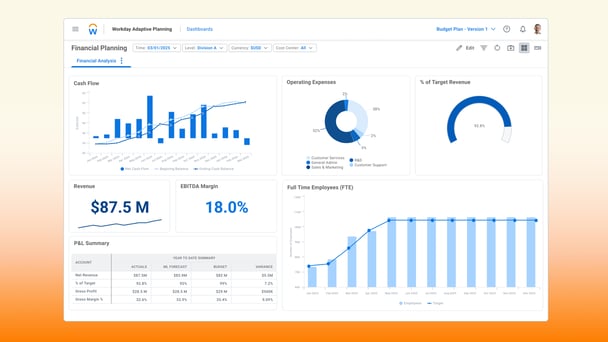
Workday Adaptive Planning is a cloud-based enterprise performance management (EPM) platform that supports budgeting, forecasting, workforce planning, operational planning, and financial consolidation. It is used by mid-market and enterprise organizations managing complex financial models across departments and regions.
It enables rolling forecasts, driver-based modeling, and scenario analysis tied to revenue, expense, and workforce assumptions.
Best for: Financial forecasting, workforce planning, and multi-entity consolidation within an enterprise system
Key features:
- Financial consolidation: Automates multi-entity consolidation processes, including eliminations and currency translation.]
- Built-in analytics and dashboards: Provides reporting views for plan versus actual comparison and forecast variance analysis
- System integrations: Connects to ERP, HR, CRM, and operational systems to centralize planning data
- Governance and security controls: Manages user access, approvals, and audit requirements within planning cycles
Pros:
- Flexible modeling to manage drivers, forecast versions, and scenario adjustments
- Reporting and analytics that provide visibility into plan versus actual performance
- Unified platform that combines financial planning and workforce planning within one environment
Cons:
- Customer support can be slow to respond
- Pricing can be high for startups and smaller teams
- Modeling concepts, navigation, and terminology can feel complex without training
How to choose the best cash forecasting software
The right cash forecasting software should improve visibility without adding operational complexity. Before selecting a platform, define what problem you’re trying to solve and how the tool will support forecasting accuracy, speed, and control.
Here’s what to evaluate.
- Map your needs: Start with your forecasting horizon and complexity. Are you managing short-term liquidity for a single entity, or multi-entity cash visibility across regions? Do you need daily updates, rolling forecasts, or long-range capital planning? Clarifying scope prevents overbuying features you do not need or underestimating required capabilities.
- Test integration with existing systems: Look for direct integrations with your ERP, accounting software, billing systems, payroll tools, and banking platforms. Manual exports defeat the purpose of automation. The best tools reduce reconciliation work by syncing live data directly into your forecast model.
- Prioritize automation and accuracy: Evaluate how the platform handles data consolidation, recalculations, and updates. Can it automatically refresh projections when transactions change? Does it reduce manual intervention? Automation should improve accuracy.
- Evaluate scenario planning capabilities: Cash forecasting should not be static. Look for a structured scenario model that lets you test changes to hiring plans, expense growth, or financing assumptions without rebuilding the model.
- Assess scalability: Choose software that supports additional entities, currencies, revenue streams, and transaction volume without forcing a system replacement in two years.
- Review reporting and visibility features: Ensure the platform provides clear visibility into projected cash balances, runway, and key liquidity drivers. Dashboards and reports should make it easy to understand changes in cash position and drill into underlying assumptions without rebuilding models manually.
- Consider ease of use: Choose software that aligns with how your team already works. An intuitive interface and familiar workflows reduce training time, improve adoption, and support consistent forecasting processes across the organization.
Optimize working capital with the best cash forecasting software
Working capital reflects how well your business converts revenue into usable cash. Without clear visibility into inflows and outflows, even profitable companies can experience strain.
The best cash forecasting software helps you move from reactive cash management to proactive working capital optimization. Instead of relying on static spreadsheets or backward-looking reports, modern tools give you:
- Real-time visibility into cash positions across accounts
- Scenario modeling to test payment timing, supplier terms, or hiring plans
- Rolling forecasts that update automatically as new data comes in
- Clear variance analysis between plan and actual performance
With better forecasting, you can tighten receivables cycles, negotiate supplier terms with confidence, reduce idle cash, and make smarter decisions about reinvestment, debt, or growth initiatives.
Ultimately, cash forecasting software does more than predict balances. It connects daily operational decisions to long-term financial health.
If your current process relies on manual updates and disconnected data, it may be time to upgrade. Better cash visibility leads to stronger working capital. And stronger working capital gives you the flexibility to grow on your terms.
Cube is the AI-powered financial intelligence platform that supercharges FP&A teams where they do their best work—across spreadsheets, browsers, chats, and beyond.