![Best strategic planning software for CFOs [2026 review]](https://www.cubesoftware.com/hubfs/Cube%20website%20-%202026/Blog%20Post%20-%20Featured%20Images/Featured%20-%20Sheet%20Lines%20Chart.png)
Key takeaways:
- Strategic planning software helps CFOs and FP&A teams move faster by centralizing data, automating analysis, and reducing manual modeling work. It turns planning cycles into an always-ready process instead of a once-a-quarter scramble.
- The best platforms make scenario planning practical, so you can test upside, downside, and baseline assumptions quickly. That makes it easier to align finance decisions with CEO and leadership priorities.
- Look for tools that integrate cleanly with your ERP, CRM, HRIS, and spreadsheets, so actuals and drivers stay current. Weak integrations create delays, version control issues, and distrust in the numbers.
What is strategic planning in finance?
Strategic financial planning is the process of determining how a business financially manages its assets to achieve ROI and growth goals. Sometimes called strategic financial management, it falls under the purview of the CFO and the FP&A team.
The first step to effective strategic planning in finance is building a solid, forward-looking financial plan that ties into the company’s goals. This means analyzing growth targets, reviewing past performance, and creating models to predict future financial scenarios. Effective planning expands the role of the CFO or FP&A team from managing current finances to shaping the company’s financial trajectory.
Long-term planning helps spot opportunities for growth, plan smart investments, and keep everyone prepared for risks. Finance teams can step up to create strategies that protect the company’s finances and drive its future success by looking at where the company is today, what’s happening in the market, and where it wants to go.
Components of strategic planning in finance
- Goal setting: Defines clear financial objectives tied to growth, profitability, and long-term business strategy, so finance decisions stay focused and measurable.
- Resource allocation: Directs capital, headcount, and operational spend toward the initiatives that deliver the highest strategic return.
- Financial forecasting and analysis: Uses historical data and forward-looking models to project outcomes, test scenarios, and guide decision-making under uncertainty.
- Risk management: Identifies financial, operational, and market risks early, then plans mitigation strategies to protect cash flow and stability.
- Performance monitoring: Tracks KPIs, variances, and results against plan to ensure execution stays on course and issues are addressed quickly.
- Alignment of cross-departmental budgets and operations: Ensures finance, operations, and leadership plans are coordinated so budgets, initiatives, and execution support the same strategic goals.

What is strategic planning software?
Strategic planning software helps organizations analyze their financial situation, develop actionable plans, and track progress against their goals. It helps reach the goal of strategic management: to ensure an excellent ROI for the business and its stakeholders in the future.
The finance sector uses strategic planning software to:
- Gain insight into financial markets
- Develop and execute successful strategies
- Analyze historical market trends and use predictive analytics to forecast future movements.
Strategic planning software helps teams determine how much risk to take for certain investments and how to manage portfolios for the best return. By leveraging this technology, finance professionals can optimize their portfolios for long-term growth and maximize shareholder value.
Of course, strategic planning solutions should also help you improve your strategic planning process.
The best strategic planning software solutions for CFOs
The best strategic planning tools help finance turn inputs into clear decisions faster. The list below highlights platforms built for scenario planning, reliable reporting, and cross-functional alignment.
We chose these companies based on financial intelligence capabilities, integration strength across core systems (ERP, CRM, HRIS, spreadsheets), planning depth (forecasting, driver-based modeling, scenarios), and control features such as permissions and audit trails, plus proven adoption in mid-market and enterprise teams.
1. Cube
.png?width=318&height=92&name=blue-cube-logo%20(1).png)
What it is: The financial intelligence platform built for the AI-era.
Who it’s for: Mid-size and enterprise finance teams that want faster planning and more strategic insights without giving up spreadsheets.
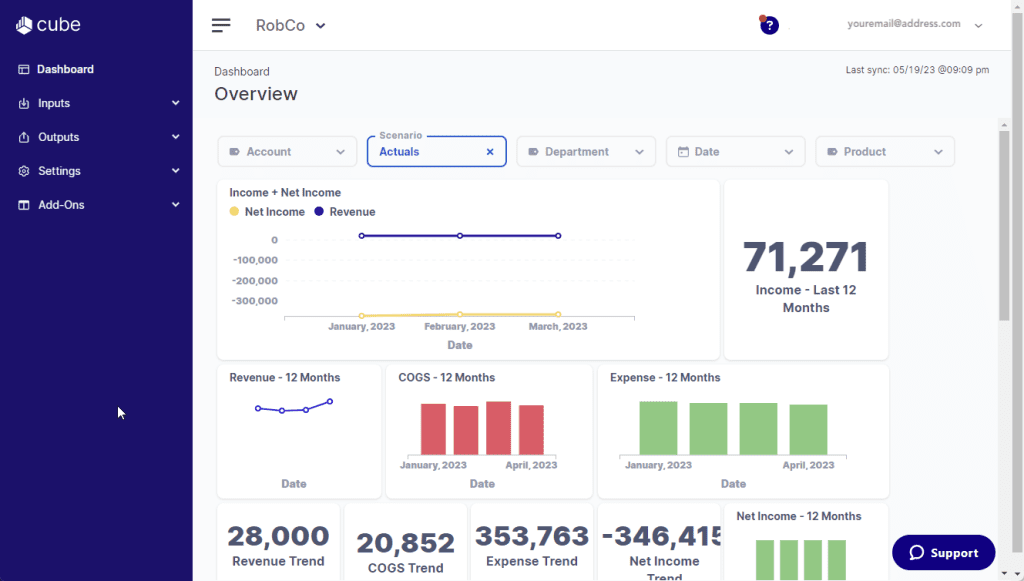
Cube is the AI-powered financial intelligence platform that supercharges FP&A teams where they do their best work: across spreadsheets, browsers, chats, and beyond. Cube unifies data from your source systems and spreadsheets into one governed, real-time source of truth, so teams can plan and report in Excel, Google Sheets, or the web with full lineage and auditability.
With Cube’s FP&Ai, FP&A teams can move from reactive reporting to proactive decision-making. Instead of bolting AI onto disconnected data, Cube pairs a unified data foundation with structured context so AI can understand your definitions and return outputs finance can verify.
Today, that includes AI-powered forecasting, smart variance analysis that explains the “why” behind the numbers, and a conversational analyst that delivers instant, data-backed insights in plain language inside tools like Slack, Teams, and Cube. Many high-growth companies (like BlueWind Medical and Edge Fitness Clubs) use Cube for all their FP&A needs.2. Data tracking, analysis, and reporting
Key features:
- Smart forecasting: Generates forecasts using historical patterns and seasonality, grounded in governed data.
- Smart variance analysis: Highlights key drivers with drillable insights and draft-ready variance explanations.
- AI analyst: Answers questions in plain language with narrative responses backed by your data.
- Unified data foundation: Connects ERP, CRM, HRIS, and spreadsheets into one source of truth.
- Enterprise governance: Cell-level security, audit trails, and multi-dimensional logic to support trust and control.
Pros:
- Connects Excel and Google Sheets with key finance and business systems to keep planning data consistent.
- Keeps teams in familiar spreadsheet workflows while adding governed data and automation.
- Speeds up analysis with explainable variance insights and conversational reporting.
Cons:
- Works best for finance teams, not personal budgeting.
- Can be more than early-stage startups need.
Pricing: Cube offers custom pricing and plans starting at $30,000 annually.
Best for: Mid-size and enterprise FP&A teams looking to save time and scale quickly.
Curious to see if Cube is a fit for your organization?

2. Anaplan

What it is: Planning software for forecasting and what-if scenarios
Who it’s for: Finance teams who need reporting and collaborating tools
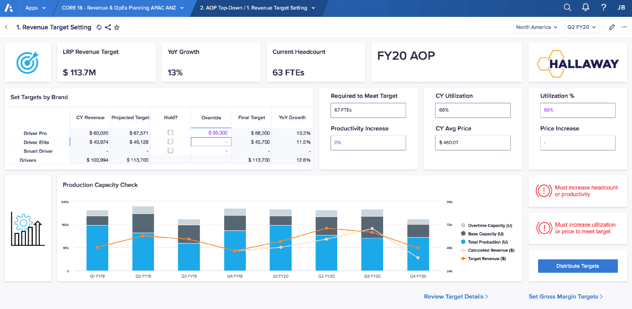
Anaplan is a cloud-based strategic planning software that helps businesses plan and model their operations. The platform provides various tools and features to support these functions, enabling users to create, manage, and share their plans and forecasts.
Anaplan's proprietary hyperblock technology enables businesses to build what-if scenarios. It also provides an application platform that enables organizations to build and customize their planning applications.
The App Hub features pre-constructed apps for sales, operations, finance, human resources, and others and a custom app module.
[Source]
Key features:
- Data synchronization: Automatically syncs data across platforms like ERP systems and spreadsheets. This eliminates the need to manually update files whenever new transactions or changes occur.
- Predictive analytics: Uses AI to analyze historical data and forecast future trends. For example, it can identify patterns in expenses or predict revenue fluctuations based on past performance.
- Interactive dashboards: Provides dashboards that display key metrics like cash flow or expenses in real time. These dashboards let users view financial trends and compare metrics across different periods.
- Inter-platform integrations: Connects with tools like accounting software, HR platforms, and CRMs. This allows all financial data to flow into one centralized system.
Pros:
- Provides a comprehensive connected planning ecosystem.
- Allows many users to contribute, review, and perform analysis planning and scenario analysis
- Uses native connectors and Anaplan Connect to integrate with other ERP system
Cons:
- Licensing and total cost can be high, especially as usage scales.
- Implementation timelines can be long, with reported averages around six months.
- Basic AI and GenAI features can be costly, with limited adoption across users.
Pricing: Pricing is not publicly available
Explore the top Anaplan competitors.
3. Workday Adaptive Planning

What it is: Planning software for financial modeling and scenario planning
Who it’s for: Finance teams managing complex planning needs with predictive analytics and real-time data
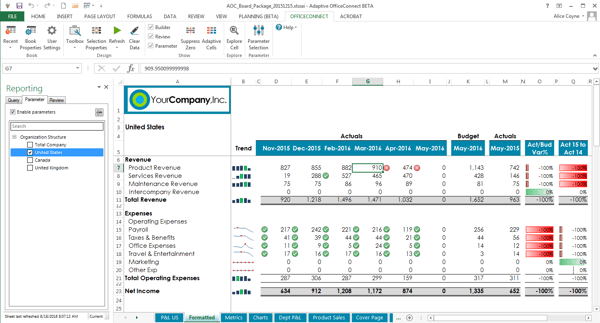
Workday Adaptive Planning is a strategic planning software that provides modeling, analytics, and cloud applications for businesses and organizations of all sizes. Workday Adaptive Planning is designed to be similar to Excel, and the core function includes budgeting, forecasting, reporting, dashboards, and financial modeling.
Workday Adaptive Planning comes with a network of global value-added resellers (VARs) that offer training and support services for each transaction.
[Source]
Key features:
- Budgeting: Provides tools to create detailed budgets based on historical financial data. This allows users to allocate resources and plan expenditures for upcoming periods.
- Forecasting data analysis: Uses data models to project future financial outcomes. For example, it can predict revenue or expenses based on past trends and changing market conditions.
- Collaboration: Includes features like shared workspaces or comment tracking that let multiple team members work on financial plans simultaneously. This ensures everyone can contribute to budgeting in the same file.
- Real-time updates: Automatically updates data as new information is added from connected systems. This ensures users are always working with the most current financial figures.
Pros:
- Unified planning across finance, workforce, and operations in a single platform.
- Forecasting and budgeting tools that support multi-level and scenario-based planning.
- Cloud-based access that supports collaboration across teams and locations.
- Native integration with Workday Financial Management and Workday HCM.
Cons:
- Implementation and initial setup can be complex and time-consuming.
- Licensing and overall cost can be high, especially for smaller teams.
- Advanced customizations and reporting may require system expertise or external support.
Pricing: Pricing is not publicly available.
Read our comparison of Anaplan vs Adaptive vs Planful vs Vena vs Datarails vs Cube.
4. Netsuite

What it is: Business management software for financial and operational planning
Who it’s for: Operations teams who need a unified platform to manage budgets, inventory, and forecasting
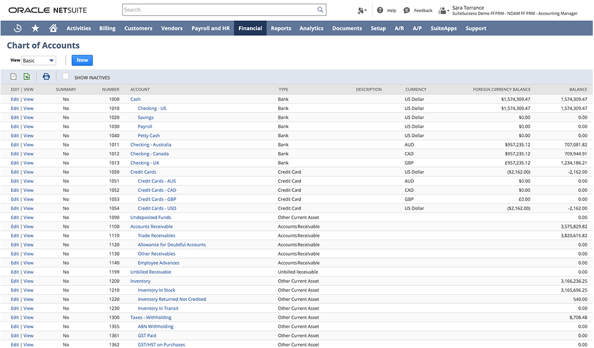
NetSuite is an integrated cloud-based business management software that offers various features spanning ERP, financials, commerce, inventory management, HR, PSA, supply chain management, and CRM. NetSuite provides businesses with automation and real-time operational and financial performance analysis. The platform’s strategic planning module helps businesses create models of long-term strategies that include financial assumptions, cash flow analysis, and resource allocations.
The software allows users to set up scenarios for testing different strategies before executing them. It enables companies to benchmark performance and compare results against competitors.
Key features:
- Workflow capability: Allows users to create and manage workflows for tasks like approvals and reporting. This ensures that financial processes follow a consistent sequence every time.
- Data import and export tools: Supports importing and exporting data between the platform and external tools like ERP systems or spreadsheets. This feature enables the transferring of large datasets without manual re-entry.
- Financial statements: Generates reports like balance sheets, income statements, and cash flow summaries. These documents provide a clear overview of a company’s financial health for decision-making.
- Audit trail: Tracks all changes made within the system, including who made them and when. This creates a detailed history of transactions and updates.
- AP automation: Automates accounts payable processes, such as invoice matching, approval routing, and payment scheduling. This streamlines vendor payments and reduces the risk of late fees.
Pros:
- Provides customizable workflows, forms and scripts.
- Integrates well with other applications and offers flexibility during implementation to match business requirements.
- Provides reliable uptime and scalability for mid-market and enterprise use cases.
Cons:
- Customer support can take time to respond.
- User interface can feel old and cluttered.
- New users can face a learning curve during onboarding.
Pricing: Pricing is not publicly available
Read our NetSuite vs Quickbooks comparison.
Did you know?
NetSuite and Cube work together. You can use NetSuite as your ERP solution and connect your data, through Cube, into Excel or Google Sheets, where you can do much of your strategic planning.
The Google Sheets integration is key here, as it makes your strategic planning and progress tracking collaborative and shareable. Everybody can always have access to the most recent data AND you can work in a highly cooperative environment. It's a win-win.
5. Jedox

What it is: Planning software for financial performance management and budgeting
Who it’s for: FP&A teams who need customizable tools for budgeting, forecasting, and integrating data across systems
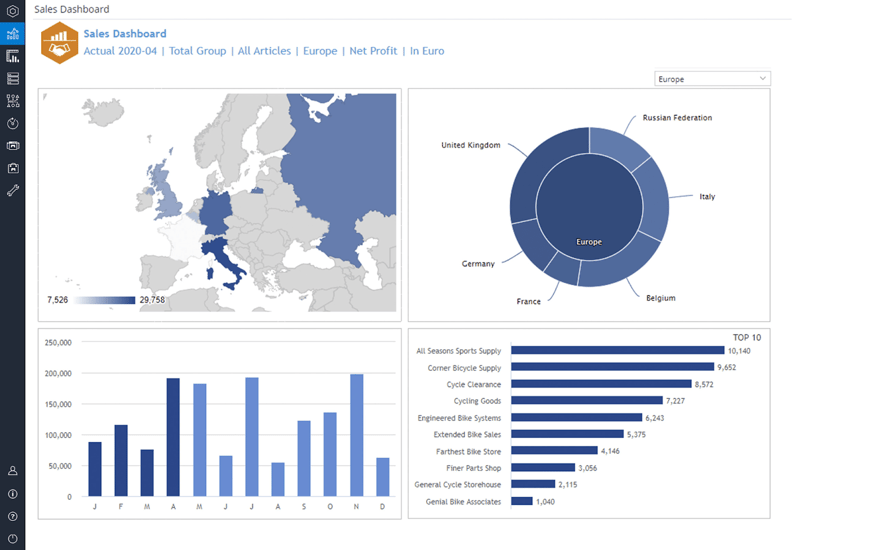
Jedox is a planning and performance management platform for finance, sales, and operations. Jedox uses artificial intelligence to offer integrated business planning.
Jedox enables users to create financial models, budgeting solutions, and forecasting models. It was designed to help organizations assess performance and make decisions on how to optimize operations.
Key features:
- Forecasting: Provides tools to create projections for future financial performance based on historical data and trends. This helps users anticipate revenue, expenses, and other financial metrics.
- Real-time data updates: Automatically updates financial data across the platform as new transactions occur. This ensures users always work with the latest figures without needing to refresh or re-enter information.
- Data visualization: Displays financial insights using charts, graphs, and dashboards. These visual tools make it easier to identify trends, compare metrics, and present data to stakeholders.
- Cash flow planning: Helps track and predict cash inflows and outflows over time. This ensures businesses can identify potential shortfalls or surpluses to manage liquidity.
Pros:
- Enables users to create relationships between different data using formulas.
- Provides a clear structure, with the web interface divided into several sections that logically distinguish from one another (modeler, designer, integrator, reports, etc.).
- Connects data from multiple systems like Excel, ERP, and CRM into one unified model.
Cons:
- Admin and reporting teams may need dedicated training time.
- Reusing the same names across different countries may not be supported.
- Initial setup and modeling can feel complex for beginners, especially without OLAP or data integration experience.
Pricing: Pricing is not publicly available
6. Planful

What it is: FP&A software for budgeting, forecasting, and financial reporting
Who it’s for: Finance teams who want to automate workflows and visualize forecasts
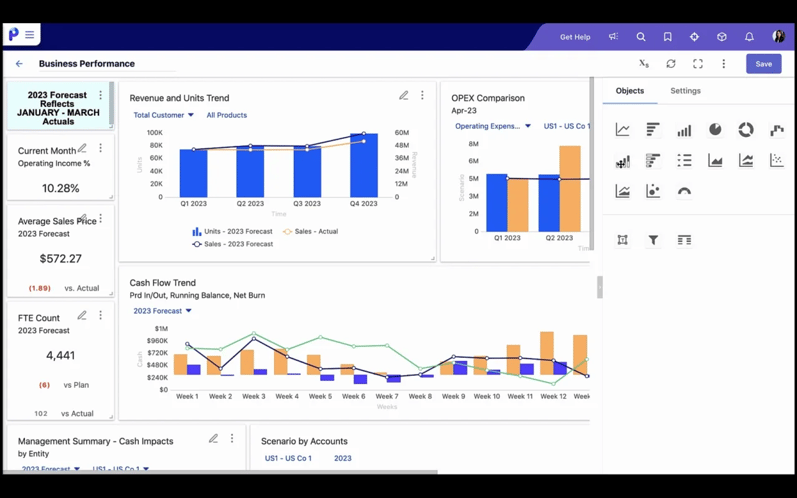
Planful, formerly Host Analytics, is one of the market's best-established FP&A platforms. Planful, as the name suggests, specializes in helping you plan better, whether in strategy, budgeting, or forecasting. It offers AI-powered features that automate daily finance tasks and provides real-time data insights through dashboards. CFOs can use Planful to make current financial decisions based on potential future outcomes.
Key features:
- Excel reporting and integrations: Connects directly with Excel to import, export, and analyze data within spreadsheets. This allows teams to use familiar tools while maintaining up-to-date financial information.
- Data visualizations: Transforms financial data into visual formats. These visuals help teams communicate insights with stakeholders.
- Personalized dashboards: Allows users to customize dashboards to display the metrics and reports most relevant to their work. This ensures quick access to key insights for their departments.
- Forecasting: Provides tools to project future financial outcomes. This helps teams prepare for changes in revenue or expenses.
- What-if scenarios: Enables users to model potential financial outcomes based on hypothetical changes to variables like costs, revenue, or external factors. This feature helps organizations evaluate risks and plan more effectively.
Pros:
- Provides a platform for centralizing and storing data from multiple sources.
- Allows users to create and manage budgets, utilize rolling forecasts, and manage the workforce
- Enables quick querying and allows teams to focus on strategic future analysis.
Cons:
- Processing and template runs can take too long, which slows forecasting and budget updates.
- Scenario archiving and dashboard permissions can be limited, which forces workarounds for storage and higher-level visibility.
- Performance can slow as usage scales, which impacts time-sensitive reporting.
7. Board

What it is: Planning software for financial modeling and predictive analytics
Who it’s for: Finance teams who need planning, simulation, and analytics
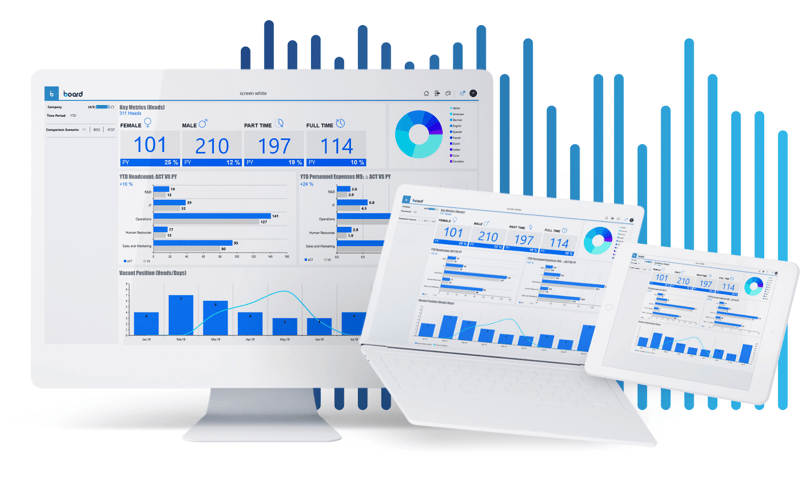
Board is a strategic planning software with predictive analytics, comprehensive financial modeling, and advanced simulation capabilities. The platform provides users with an intuitive user interface and workflow, enabling them to define goals, set objectives, analyze data, track progress, and make necessary changes.
Board uses advanced machine learning algorithms to help companies forecast future outcomes based on past performance and current trends.
Key features:
- Data column filtering, discovery, and visualization: Lets users filter and sort large datasets to focus on specific categories. For example, finance teams can isolate data for a particular department, visualize it in graphs, and uncover trends at a granular level.
- Auto-modeling: Automatically creates financial models based on inputted data. This feature might generate a complete revenue projection without requiring users to build formulas from scratch.
- Predictive analysis: Uses historical data and AI to predict future outcomes like revenue growth or cost fluctuations. For example, a CFO could see projected sales dips in a specific quarter and plan adjustments accordingly.
- Report generation: Automatically compiles financial data into professional reports like income statements or cash flow summaries. These reports can be shared with stakeholders or used internally for decision-making.
- Simple dashboards: Provides easy-to-navigate dashboards that display key metrics or benchmarks. This gives users a snapshot of financial health without needing to dig through spreadsheets.
Pros:
- Serves as a track recorder of all the old data that has been removed and new data that has been added.
- Allows users to keep all meeting documents, schedules, and notes in one secure place.
- Enables users to build and customize dashboards without heavy coding.
Cons:
- Performance slows with large datasets or heavy concurrent calculations.
- Reports are difficult to create, especially compared to stronger drag-and-drop tools.
- Flexibility feels excessive in some cases, with limited templates and accelerators for common use cases.
Pricing: Pricing is not publicly available
8. OneStream

What it is: Corporate performance management software for financial consolidation, planning, and reporting
Who it’s for: Teams who need to centralize budgets, forecasts, and reconciliation from multiple data sources
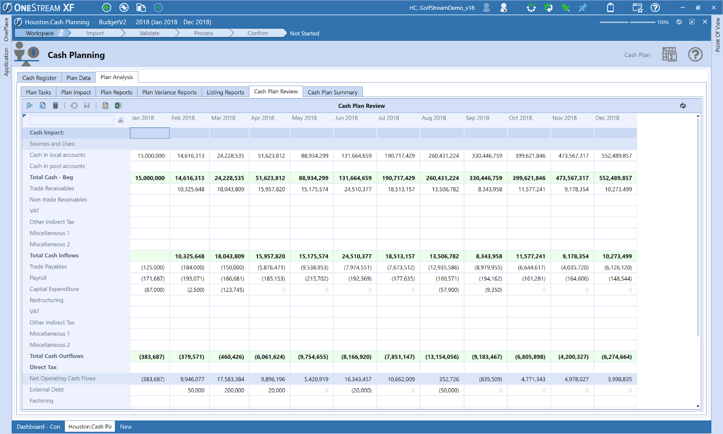
OneStream is a CPM 2.0 solution that offers financial consolidation, planning, reporting, analytics, and financial data quality services to medium and large-sized companies.
OneStream is used to streamline financial processes, replace outdated legacy applications, and decrease the overall cost of ownership for financial systems. It allows teams to spend less time dealing with data integration and system maintenance.
 Key features:
- Data integration, reporting, and transformation: Combines data from multiple sources, organizes it into usable formats, and generates detailed reports. CFOs can consolidate information from ERP systems and spreadsheets to create a single financial summary.
- BI dashboarding: Offers business intelligence dashboards to visualize financial data in real-time. CFOs can use these dashboards to track KPIs like cash flow or department spending.
- Marketplace solutions like Task Scheduler and Security Audit: Provides tools for automating routine processes like scheduling tasks or running system audits.
- Budgeting, forecasting, and reconciliation: Helps create budgets, forecast financial scenarios, and make sure accounts are accurate. CFOS can adjust budgets based on current performance and reconcile discrepancies in real time.
Pros:
- Allows complete flexibility in managing actuals, forecast, budget across different cubes
- Enables users to combine stage data, cube data and metadata
- Intuitive workflows and consistent user experience
Cons:
- Implementation timelines run long, with reported averages around eight months.
- Licensing and implementation costs are high, especially for smaller teams.
- New admins and analysts face a steep learning curve during onboarding.
Pricing: Pricing is not publicly available
9. Cascade

What it is: Planning software for strategy mapping and goal tracking
Who it’s for: Teams looking to review and align KPIs with long-term growth goals
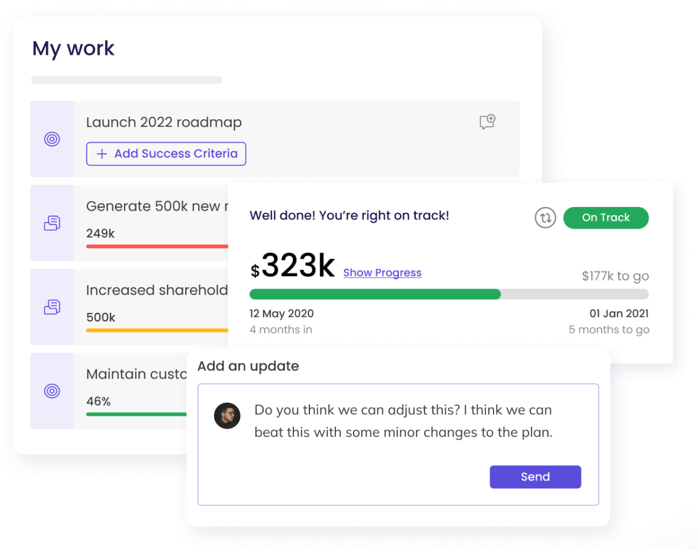
Cascade is a cloud-based strategic planning software solution to help businesses develop long-term growth plans. It focuses on critical areas of the planning process, such as goal setting, budgeting, monitoring progress, and managing resources.
Cascade also includes features for collaboration, analytics, reporting, and visualizing data. The software's analytic capabilities enable businesses to review past performance and adjust future action plans accordingly.
It’s designed to be used by team members of any level and can integrate with other corporate systems.
 Key features:
- Strategy mapping and modeling: Provides tools to create visual strategy maps and develop models for achieving business goals. For example, CFOs can model the financial impact of launching a new product.
- Defines and monitors objectives and key results: Helps set measurable objectives and track progress toward achieving them. CFOs can monitor sales growth targets and see whether they are meeting monthly goals.
- Monitor the progress of strategy-related activities: Tracks the completion status of projects and initiatives tied to strategic goals. This ensures teams stay aligned with timelines and deliverables.
- Departmental KPI reporting: Generates reports that display key performance indicators for individual departments. For example, finance teams might track expense ratios, while marketing monitors campaign ROI.
Pros:
- Clear, centralized visibility into strategy, objectives, and progress across teams.
- Strong progress tracking with KPIs, OKRs, and real-time performance views.
- Responsive customer support and customer success teams that actively assist users.
Cons:
- Reporting and dashboards offer limited customization compared to some alternatives.
- Occasional performance latency when generating reports or updates.
- Mobile experience is less robust than the web platform.
Pricing:
- Cascade Free: $0
- Essentials: Pricing is not publicly available
- Enterprise: Pricing is not publicly available

10. Jirav

What it is: FP&A software for financial modeling
Who it’s for: CFOs and finance teams creating scenario plans and sharing financial reports
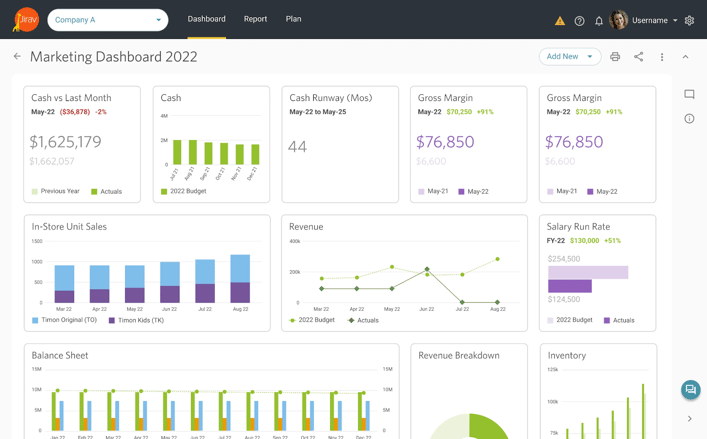
Jirav is a driver-based planning platform with features for CFOs to customize reporting and planning. Users can create KPI packages that summarize the current state of their financial health to stakeholders. They can also create new scenario plans based on key business drivers.
Key features:
- Driver-based planning platform: Enables planning based on key business drivers like revenue growth or cost per unit. CFOs can adjust variables like sales volume to see how changes impact overall financial outcomes.
- Templated and custom reporting: Offers pre-built templates for common reports and the ability to create customized ones.
- Shareable dashboards: Provides dashboards that can be shared with team members or stakeholders. This feature ensures everyone has access to the same financial insights.
[Source]
Pros:
- Intuitive workflow for analyzing, modeling, and planning.
- Robust visual presentation for stakeholder-ready reporting.
- Live integrations with accounting systems like QuickBooks for up-to-date financials.
Cons:
- Complex assumptions and conditional logic take more effort to build than in Excel.
- Dashboards and visuals can overwhelm clients who prefer simpler summaries.
- Report and custom table limits can cap how much reporting you can build in one environment.
Pricing
Jirav has two pricing tiers:
- Industry Safari: $20,000+
- Strategy Safari: Pricing is not publicly available
11. Sage Intacct

What it is: Financial management software for automating accounting processes and gaining operational insights
Who it’s for: Finance teams managing accounting tasks and multi-entity consolidations
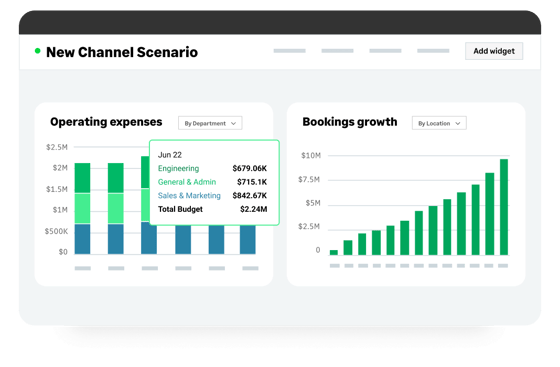
Sage Intacct is a cloud-based financial management and accounting software for small to midsize organizations. It helps businesses automate critical financial processes and gain insights into their operational performance. It's tailored to accommodate the needs of each accountancy firm and comes with a comprehensive suite of functionality that will streamline core financials.
Sage Intacct provides core accounting applications like the general ledger, accounts payable and receivable, cash management, and order management. It supports functionality for built-in dashboards, real-time reporting, time and expense management, project accounting, revenue management, and global consolidations for multiple entities.
Key features:
- Audit trail: Tracks every action taken within the system like edits of financial data or approvals. This provides a complete history of changes for accountability and compliance purposes.
- Invoice customization: Allows businesses to customize invoices with their branding or payment terms details. For example, CFOS can add their company logo or specify due dates directly on the invoice template.
- AP automation: Automates accounts payable processes like invoice matching and vendor payments. This ensures payments are processed on time without manual intervention.
- Performance and reliability: Users can rely on consistent system performance to handle large data sets and critical financial operations.
Pros:
- Enables users to title their invoices with specific details.
- Uses a financial report writer to create reports on demand.
- Allows users to drill-down from high-level dashboards to transaction-level details
Cons:
- Address and customer record updates do not always flow into existing invoices or sales orders.
- Recurring invoice and autopay logic can trigger unintended payments across open invoices.
- Report generation slows or times out with large data volumes or long reporting periods.
Pricing: Pricing is not publicly available
Bonus: Top AI-powered tools for strategic planning
AI-powered tools help CFOs by automating tedious tasks and uncovering data anomalies that could take long amounts of time to manually discover.
- Cube simplifies financial planning, reporting, and analysis for businesses. Their AI powers forecasting, variance analysis, and data validation to save time and reduce manual effort for finance teams. Jumpstart planning tasks with proposed forecasts, highlight variances, and flag inconsistencies automatically so your data stays accurate and your team can focus on strategy.
- ClearPoint Strategy integrates project tracking with KPI reporting to allow one view of the truth in your organization.
- Notion AI writes, spell checks, and summarizes key points, lengthy text, and databases in existing strategic planning notes.
- Pigment uses machine learning to forecast the futures of your business.
Key features of strategic planning software
Strategic planning software offers a range of features designed to bring greater efficiency and effectiveness to financial planning and corporate management.
1. Project management
Strategic planning software can help organize and track team activities around specific projects. It facilitates team collaboration by providing a centralized communication and task assignment hub.
For example, project milestone tracking can help ensure tasks are completed on time and the project runs according to schedule. Other features like Gantt charts help users visualize project lifecycles and timelines.
2. Data tracking, analysis, and reporting
Strategic planning software solutions offer a range of features that enable businesses to track their progress, uncover valuable insights, and communicate their results to stakeholders.
- Data tracking allows users to follow the progress of their goals and objectives, identify trends in performance, and access relevant data.
- Analytical capabilities enable users to quickly and automatically compare metrics across different periods or areas of the business.
- Reporting capabilities provide comprehensive yet concise documentation that presents key performance indicators in an easy-to-read format.
3. Strategy development
Strategy development is a crucial aspect of running a successful business. It involves creating and implementing plans to achieve specific goals and objectives. A good strategic planning solution should:
- Provide users with the tools they need to develop actionable strategies tailored to their needs. This may include setting objectives and milestones, creating an actionable timeline, assigning tasks to team members, and creating a budget.
- Allow users to monitor progress and adjust their strategies as needed.
- Provides users with scenario analysis, sensitivity analysis, and other analytic templates that enable businesses to evaluate different scenarios and identify potential risks and opportunities.
Some corporate planning software programs offer predictive analytics capabilities that help businesses understand how external factors may influence their strategies.
Businesses can forecast, budget, and plan accordingly using industry trends, economic indicators, and customer sentiment surveys.
Benefits of using strategic financial planning software
The advantages of using strategic planning software include the following:
Strong collaboration
Strategic planning software provides a single source of truth, enabling teams to move faster and collaborate in one place. The 2024 FP&A Trends Survey reports that Excel remains the primary planning tool for 52% of organizations, often leading to multiple versions of the same model and slower coordination.
With a centralized planning platform, finance and business teams work from the same assumptions, actuals, and forecasts. Everyone sees the same numbers, updated on the same cadence, which reduces time spent comparing files, resolving discrepancies, or confirming which version is correct.
It also cuts busywork. The same survey found that FP&A teams spend 45% of their time on data collection and validation. Centralized inputs reduce that effort, allowing teams to spend more time reviewing scenarios, discussing tradeoffs, and supporting decisions sooner.
Improved decision making
Strategic planning is a disciplined effort that produces fundamental decisions and actions to shape and guide an organization. FP&A analysts use the software for driver-based forecasting and multi-scenario planning to evaluate the company’s current position and model what comes next.
With these tools, executives can outline financial objectives, assess market risks, and create forward-looking plans that safeguard the company’s financial health. Speed is a real advantage here: the 2024 FP&A Trends Survey found that only 18% of organizations forecast within 2 days, while 53% take over 5 days. Once the plan is in place, the software makes it easier to track progress, refresh assumptions, and adjust quickly as conditions change.
Better visibility
Advanced analytics and reporting capabilities provide a holistic view of company performance. That visibility helps leaders assess the financial trajectory and align plans with strategic goals. It also addresses a common gap: EY found only 17% of treasurers report complete near-real-time cash visibility, often because teams lack the tools to aggregate financial data.
Strategic planning software helps by turning raw numbers into easy-to-read dashboards, tables, and charts that update as data changes. Teams across departments can quickly see what’s happening, understand the financial impact of decisions, and respond faster to market shifts or emerging risks.
Better strategic execution
Continuous planning also becomes more straightforward, as strategic management software makes planning processes simpler and easier to follow. So the cost of creating and refining strategic plans goes down.
With access to more performance data, businesses can use these insights to guide strategic initiatives, improve project portfolio management, and adapt their approach as needed. This proactive planning helps finance teams move from managing the present to shaping the company’s future trajectory.
Increased accuracy
With 45% of FP&A time still spent on data collection and validation, FP&A teams that use strategic financial planning software reduce reliance on manual spreadsheets, helping limit version-control issues and formula errors.
By centralizing assumptions, actuals, and forecasts in a single system, finance teams work with consistent data throughout planning cycles. The presence of validation rules, standardized models, and controlled inputs makes forecasts and reports easier to trust, which supports clearer discussions with leadership when decisions depend on precise numbers.
Streamlined reporting
According to an Insightsoftware survey, more than two-thirds of IT and finance professionals spend a day each week on operational reports, time that could otherwise go to variance review, scenario updates, and leadership-facing analysis.
Strategic financial planning software simplifies reporting by consolidating financial and operational data into a single, structured workflow, so updates follow the same definitions and rollups each cycle. With repeatable templates and centralized KPI definitions, FP&A teams spend less time rebuilding reports and more time reviewing drivers, variances, and actions.
Risk mitigation
Strategic financial planning software helps teams identify and assess risk earlier in the planning process. Scenario modeling and sensitivity analysis allow finance leaders to test how changes in revenue, costs, or market conditions impact outcomes.
KPMG also notes that tools such as scenario planning and sensitivity analysis help teams “measure and quantify risks and opportunities,” so leaders can see downside exposure before it hits results. This proactive approach supports steadier decision-making and reduces surprises during execution.
How to select the right strategic planning software
The right strategic planning software empowers organizations to identify growth opportunities, mitigate risks, and improve collaboration across teams. Selecting a solution that supports long-term planning and adapts to your evolving needs can turn your finance function into a strategic driver for success. Let’s explore how you can select the right software to shape your organization’s financial trajectory.
1. Assess integration and compatibility
Verify whether the software integrates seamlessly with existing systems like ERPs, CRMs, or accounting platforms. For example, a system that syncs directly with your ERP can automatically pull in financial data, saving your team time from manual entry. Check compatibility with your IT team to choose software that works smoothly with your tech stack. A lack of integration can lead to unnecessary downtime and costly workarounds later.
2. Involve stakeholders
Involve key stakeholders like finance, operations, and IT teams early in the selection process. Hosting workshops or surveys can help uncover specific departmental needs and pain points the software must address. Collaboration ensures buy-in from all teams and reduces resistance to adoption later. This level of teamwork helps align software capabilities with both immediate and long-term business goals.
3. Analyze cost vs. benefit
Perform a detailed cost-benefit analysis to understand the value the software will bring to your organization. Consider monthly subscription fees, licensing fees on the investment end, and the savings from improved efficiency and reduced errors on the returns end.
For example, a platform that automates manual workflows might save hours of labor each week, translating into thousands of dollars in saved time. Balancing direct costs with indirect benefits like scalability and improved decision-making will lead to a higher ROI.
4. Evaluate software features
Focus on features that address your organization’s unique needs, such as real-time reporting, customizable dashboards, or scenario-planning tools. For example, if your business struggles with visualizing KPIs, prioritize software with easy-to-understand data visualization capabilities.
Ensure the platform can handle your data volume and complexity, especially if you work across multiple departments or regions. Avoid overwhelming your team with unnecessary features that don’t align with your goals.
Automate and improve your planning with the right strategic planning software
Now that you know all about the best strategic planning software, you’re ready to choose the right solution for your business. The right platform helps CFOs save time, prioritize resources, and adapt to unexpected market changes. It enables your team to track performance metrics, adjust forecasts, and create financial plans that align with your company’s goals.
Focus on tools that address your biggest challenges first. Investing in software that simplifies workflows and supports growth allows you to make critical decisions quickly and confidently.
For CFOs looking for a strategic planning software that offers seamless integration with Excel and Google Sheets, automated data consolidation, and real-time insights, consider Cube.
Cube brings agentic AI into a spreadsheet-native FP&A platform, so finance teams can use AI for analysis while keeping ownership of the narrative. With Cube, finance teams can run multiple scenarios across different plans, compare outcomes, and use dashboards to review headcount data in a single view for org design and budget discussions.
Book a free demo with Cube today.